用python爬取豆瓣网页
python作为一种已经广泛传播且相对易学的解释型语言,现如今在各方面都有着广泛的应用。而爬虫则是其最为我们耳熟能详的应用,今天笔者就着重针对这一方面进行介绍。
python 语法简要介绍
python 的基础语法大体与c语言相差不大,由于省去了c语言中的指针等较复杂的结构,所以python更被戏称为最适合初学者的语言。而在基础语法之外,python由其庞大的第三方库组成,而其中包含多种模块,而通过模块中包含的各种函数与方法能够帮助我们实现各种各样的功能。
而在python爬虫中,我们需要用到的标准库有:
其中urllib库可以帮助我们爬取目标网页的html代码,bs4中的beautifulsoup模块以及re库中的正则表达式可以将我们需要的数据从代码中提取出来,而xlwt库可以将数据储存至excel表中,从而最终完成数据的爬取。
接下来,就步入我们此次介绍的重点——完整爬取一个网页的数据。
本篇文章以爬取豆瓣电影top250的数据为例,并将爬取的过程分为三个部分:
1.爬取网页
2.解析网页
3.储存网页
那么,让我们开始吧!
豆瓣top250网址:https://movie.douban.com/top250?start=
爬取网页
引入urllib库中的request模块
urllib库的基本操作可参考该网址:
https://www.cnblogs.com/qikeyishu/p/10748497.html
1
2
3
4
5
6
7
8
9
10
11
12
| def askURL(url):
head = {
"User-Agent": "Mozilla / 5.0(Windows NT 10.0;Win64;x64) AppleWebKit / 537.36(KHTML, likeGecko) Chrome / 88.0.4324.182Safari / 537.36"
}
request = urllib.request.Request(url,headers=head)
response = urllib.request.urlopen(request)
html = response.read().decode("utf-8")
return html
|
1.其中urllib.request.Request可以帮我们把要爬取的网页的url及其他的头部信息封装至一起。
2.urlopen函数则可以帮助我们爬取下该网页的html代码
3.有一些网站会设置一下反爬机制来阻止我们的爬虫,此时就需要我们设置头部信息来模拟浏览器访问网站
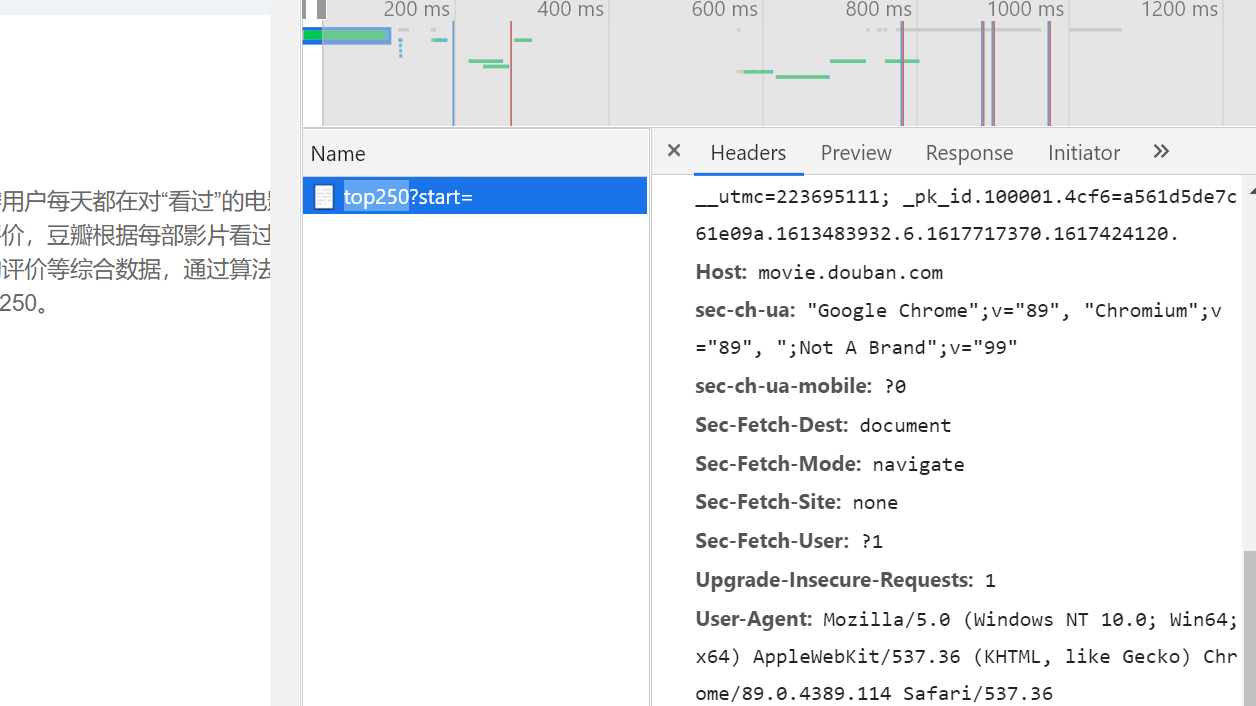
需要用浏览器进入该网址,使用开发者模式获取我们需要的头部信息(也就是该图中的user-agent)
4.最后需要将我们的爬取下的html代码转化为utf-8格式进行输出
解析网页
1
2
| import re
from bs4 import BeautifulSoup
|
引入re库和bs4库
beautifulsoup模块的基本操作可参考该网址:
http://www.jsphp.net/python/show-24-214-1.html
re库的基本操作可参考该网址:
https://www.runoob.com/python3/python3-reg-expressions.html
1
2
3
4
5
6
7
8
9
10
| def getData(baseurl):
datalist = []
for i in range(0,10):
url = baseurl + str(i*25)
html = askURL(url)
soup = BeautifulSoup(html,"html.parser")
|


逐页进行解析,使解析出的数据能被我们接下来要使用的正则表达式识别
所谓正则表达式,就是对字符串操作的一种逻辑公式,就是用事先定义好的一些特定字符、及这些特定字符的组合,组成一个“规则字符串”,这个“规则字符串”用来表达对字符串的一种过滤逻辑,通过这种过滤,就可以得到我们想要的信息,就例如影片的名称,评分等信息。
1
2
3
4
5
6
7
8
| findlink = re.compile(r'<a href="(.*?)">')
findImgSrc = re.compile(r'<img.*src="(.*?)"',re.S)
findtitle = re.compile(r'<span class="title">(.*)</span>')
findscore = re.compile(r'<span class="rating_num" property="v:average">(.*)</span>')
findjudge = re.compile(r'<span>(\d*)人评价</span>')
findinq = re.compile(r'<span class="inq">(.*)</span>')
findbd = re.compile(r'<p class="">(.*?)</p>',re.S)
|
1
2
3
4
5
6
7
8
9
10
11
12
13
14
15
16
17
18
19
20
21
22
23
24
25
26
27
28
29
30
31
32
33
34
35
36
37
38
39
| for item in soup.find_all("div",class_="item"):
data = []
item = str(item)
link = re.findall(findlink,item)[0]
data.append(link)
ImgSrc = re.findall(findImgSrc,item)[0]
data.append(ImgSrc)
title = re.findall(findtitle,item)
if len(title)==2:
ctitle = title[0]
data.append(ctitle)
otitle = title[1].replace("/","")
data.append(otitle)
else:
data.append(title[0])
data.append(" ")
score = re.findall(findscore,item)
data.append(score)
judge = re.findall(findjudge,item)
data.append(judge)
inq = re.findall(findinq,item)
if len(inq)!=0:
inq = inq[0].replace("。","")
data.append(inq)
else:
data.append("")
bd = re.findall(findbd,item)[0]
bd = re.sub('<br(\s+)?/>(\s+)?'," ",bd)
bd = re.sub('/'," ",bd)
data.append(bd.strip())
datalist.append(data)
print(datalist)
return datalist
|
以上代码能通过正则表达式抽取出需要的数据存放data列表中,然后将所有的data数据存放至datalist列表中。
储存网页
将解析出的数据储存到excel表中
引入xlwt库
xlwt的基本操作可参考该网址:
https://www.cnblogs.com/caesar-id/p/11802440.html
1
2
3
4
5
6
7
8
9
10
11
12
13
14
15
16
17
18
| def savepath(datalist):
workbook = xlwt.Workbook(encoding="utf-8")
worksheet = workbook.add_sheet("sheetwdy")
col = ("电影详情链接", "图片链接", "影片中文名", "影片外国名", "评分", "评价数", "概况", "相关信息")
for i in range(0, 8):
worksheet.write(0, i, col[i])
for i in range(0, 250):
print("第%d条" % (i + 1))
data = datalist[i]
for j in range(0, 8):
worksheet.write(i + 1, j, data[j])
workbook.save("豆瓣250.xls")
|
如此我们便可以把解析出的数据存储至excel表中了
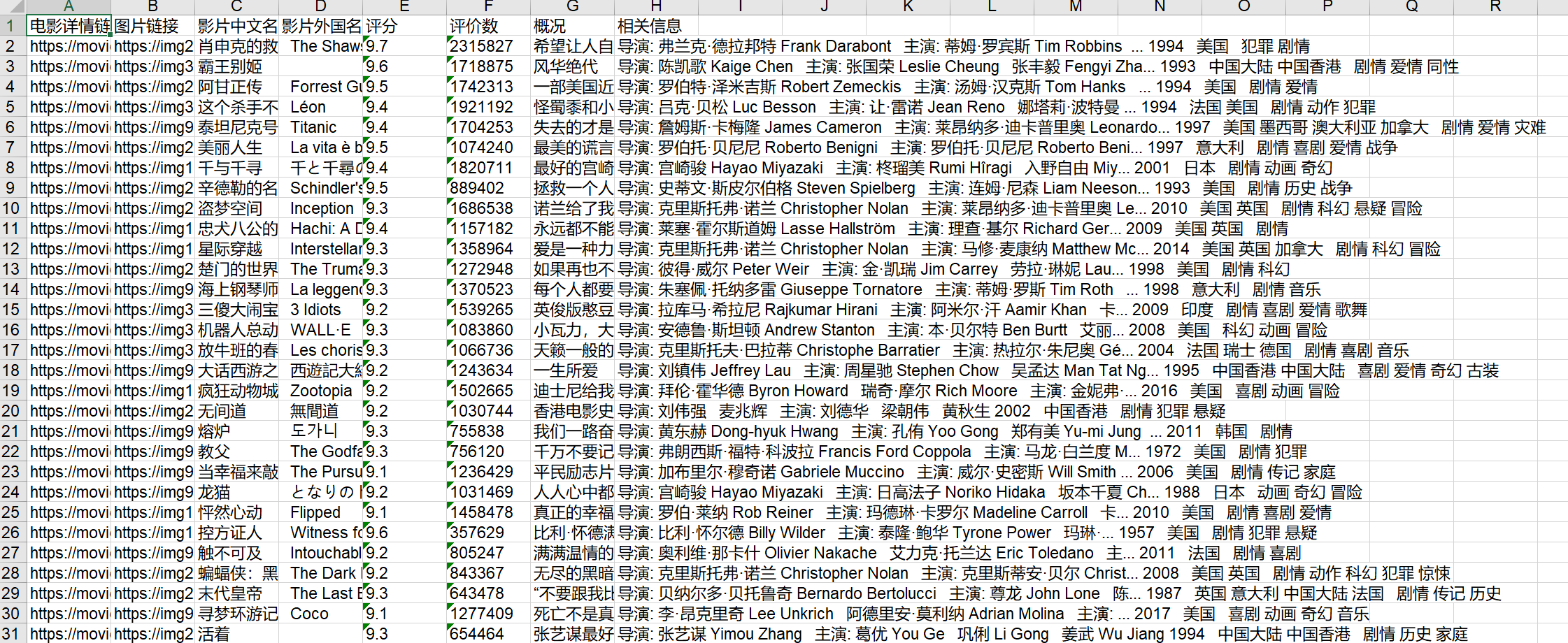
以上便为成品图